

EZPass Florida, also known as E-PASS, is the electronic toll system run by the Central Florida Expressway Authority (CFX). It lets drivers pay tolls automatically across Florida and 18 other states. This guide covers everything about EZPass Florida login, sign up, payments, fees, savings, rental cars, and customer support.
This explains everything about EZPass Florida and E-PASS, including how to log in, create an account, activate a transponder, make toll payments, manage your balance, and maximize toll savings. It also covers account features, payment options, transponder types, and common account tasks using simple, easy-to-follow language for every driver.
EZPass Florida Login: Step to Access
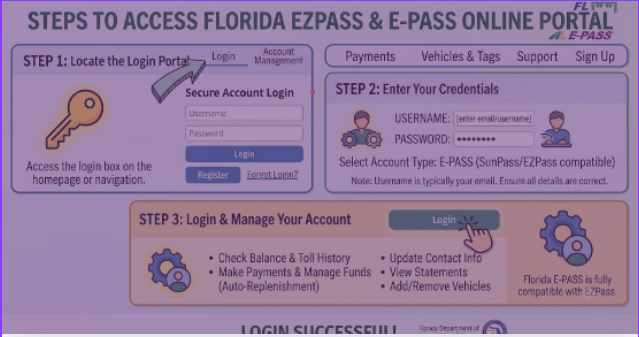
EZPass Florida login gives you full access to your toll account. You can check your balance, view trips, add vehicles, reload funds, and update payment details. The login takes less than two minutes from any device with internet.
Step 1: Navigate to the Official Portal
Open your web browser and go to epass.cfxway.com. Click the “Manage E-PASS” button on the home page. This takes you directly to the secure login screen. Always type the URL yourself. Never click links from emails or text messages, since scammers copy the real login page to steal passwords.
Step 2: Enter Your Login Details
Type your username in the first box. Your username is usually the email address you used when you signed up. Type your password in the second box. Click the “Sign In” button to enter your account dashboard. If you are new, click “Create an Account” to register first.
Step 3: Handle Login Problems
If you forgot your password, click “Forgot Password” below the login box. Enter your email address. The system sends a reset link to your inbox. Click the link and create a new password. If the reset email does not arrive within five minutes, check your spam folder. You can also call 407-823-7277 for help.
Step 4: Access Your Account Features
After login, you reach the main dashboard. From here, you can see your current balance, recent trips, and account status. Click any menu item to manage vehicles, view statements, reload funds, or update personal details. The dashboard works the same on phones, tablets, and computers.
Security Tips for EZPass Florida Login
Keep your account safe with these simple habits. Use a strong password with letters, numbers, and symbols. Change your password every three months. Never share your login details with anyone. Log out when using shared computers or public Wi-Fi. Enable two-factor authentication if available. Watch for fake emails that ask for your password. E-PASS staff never ask for passwords by phone or email.
Bookmark the official site to avoid fake pages. Test your login once a week to catch problems early. If you see strange charges or unfamiliar logins, contact customer service right away.
How to Sign Up for EZPass Florida
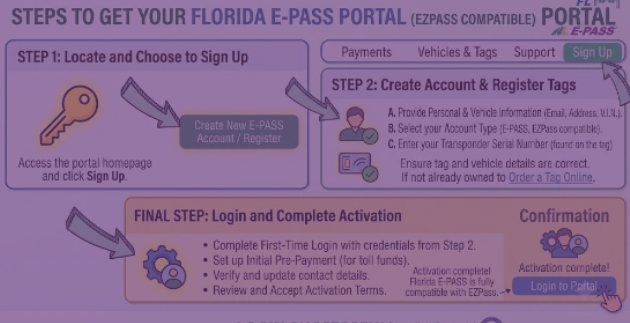
Signing up for EZPass Florida takes about ten minutes. You need a valid email, your driver’s license, vehicle plate number, and a credit or debit card. The minimum starting balance is $10 per transponder.
Step 1: Visit the Registration Page
Go to epass.cfxway.com/GetEPASS. Click “Sign Up Now” or “Create Account.” The registration form opens in a new tab.
Step 2: Build Your Profile
Enter your full legal name, mailing address, phone number, and email. Create a username and password. Your username can be your email or a custom name. Make sure your password is at least eight characters long. Use a mix of upper and lower case letters with at least one number.
Step 3: Link Your Vehicle
Enter your license plate number, state, vehicle make, and model. You can add more vehicles later from your dashboard. Each vehicle can have its own transponder or share one if you drive them at different times.
Step 4: Add Payment Method
Link a credit card, debit card, or bank account. This pays for tolls and automatic reloads. Set your auto-reload amount. A common choice is $25 to $50. Set your low-balance alert so you know when funds run low.
Step 5: Choose Your Transponder
Pick between the free sticker transponder or the Uni portable unit. The sticker works for one vehicle only and mounts inside the windshield. The Uni portable works on any vehicle and moves between cars, motorcycles, or rentals. Uni costs $14.95 plus tax but works in 19 states.
Step 6: Review and Submit
Double-check all details. Click “Submit” to complete registration. You receive a confirmation email within minutes. Click the link in the email to verify your address. Your transponder ships in five to seven business days, or you pick it up at a service center the same day.
What is EZPass Florida?
EZPass Florida is the prepaid electronic toll collection system from the Central Florida Expressway Authority. It started in 1994 to help drivers skip cash toll booths on Central Florida expressways. Today, it works on every toll road in Florida and connects with toll systems in 18 other states from Maine to Texas.
The system uses a small transponder mounted on your windshield. As you drive through a toll plaza, a radio reader above the road picks up your transponder signal. The toll amount deducts from your prepaid balance automatically. You never stop, never roll down your window, and never fumble for change.
How to Activate EZPass Florida
Activating your new transponder is fast. You can do it online, through the app, by phone, or in person. Most drivers finish activation in five minutes.
Online Activation
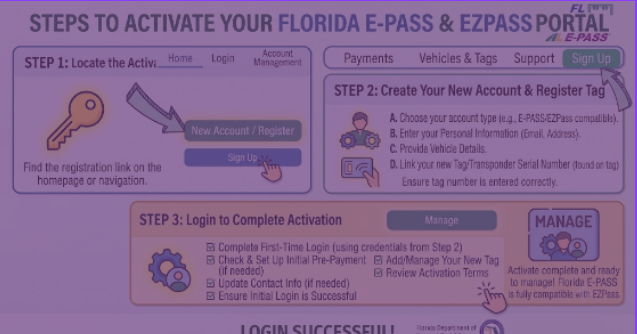
Log into your EZPass Florida account at epass.cfxway.com. Click “Activate Transponder” under the Account menu. Enter the serial number printed on the back of your transponder. Choose the vehicle you want to link it to. Click “Activate.” The system confirms immediately, and your transponder works on the next toll plaza you pass.
Mobile App Activation
Open the E-PASS app on your iPhone or Android phone. Sign in with your account details. Tap “Add Transponder” and scan the barcode with your phone camera. Confirm the vehicle link. Activation completes in seconds.
Phone Activation
Call 407-823-7277 during business hours. Have your transponder number and account login ready. A representative activates the device while you are on the line.
In-Person Activation
Visit the E-PASS Service Center at 525 S. Magnolia Ave., Orlando, FL 32801. Bring your transponder and photo ID. Staff activates the device and helps you mount it correctly. Same-day service is available Monday through Friday from 7:30 a.m. to 7 p.m. and Saturday from 8 a.m. to 4:30 p.m.
Mounting Your Transponder
For sticker transponders, peel the backing and stick it to the inside of your windshield. Place it about two inches below the rearview mirror mount, on the passenger side. Clean the glass first with rubbing alcohol. Press firmly for 30 seconds.
For portable Uni transponders, attach the clip to your sun visor. The device should face forward toward the windshield. You can move it between vehicles as needed.
Managing Your EZPass Florida Account
Your EZPass Florida account puts you in control of all toll activity. The online portal and mobile app give you 24/7 access from anywhere.
Check Balance and Trips
The dashboard shows your current balance in large numbers. Scroll down to see recent toll transactions with date, time, location, and amount. Click any trip for full details including the specific toll plaza and rate charged.
Add or Remove Vehicles
Click “Vehicles” in the account menu. You see all linked plates. Add a new vehicle by entering the plate number, state, make, model, and year. Remove vehicles when you sell a car or no longer use them. You can link up to 10 vehicles on a personal account.
Update Personal Information
Change your address, phone number, or email any time through the “Profile” section. Keep this current so invoices and notices reach you. Update your password from the “Security” tab.
Reload Funds
Set up auto-reload so your balance never drops too low. Choose an amount like $25 or $50 and a low-balance trigger like $10. When your balance hits the trigger, the system adds your chosen amount automatically using your saved payment method. You can also reload manually any time by clicking “Add Funds.”
Download Statements
View and download monthly statements for personal record-keeping or business expense reports. Statements list every toll transaction with dates, locations, and amounts. PDF format is available for printing or email sharing.
EZPass Florida Business Accounts
Businesses with vehicles can save time and money with an EZPass Florida business account. This option works for company cars, delivery vans, trucks, and any commercial vehicle that uses toll roads.
Business Account Benefits
Link 10 or more vehicles under one account. Get a single monthly invoice for all tolls across all vehicles. Track spending by vehicle, driver, or department. Export transaction data to accounting software or spreadsheets. Receive volume discounts on heavy use. Set spending limits per vehicle to control costs.
How to Open a Business Account
Business accounts require a phone call or email. Call 407-690-5400 during business hours. Or email [email protected]. Provide your company name, federal tax ID, business address, and vehicle list. A business account representative guides you through setup. Account approval takes two to three business days.
Business Account Features
After approval, you log into the same portal as personal accounts. The dashboard adds business-specific tools. You see a fleet overview with all vehicles and total monthly spending. Click any vehicle for individual trip history. Generate reports by date range, vehicle, or driver. Download data as CSV for QuickBooks or Excel. Business accounts pay the same toll rates as personal accounts. The main savings come from time saved on billing and better expense tracking. Larger fleets may qualify for additional volume rebates.
College E-PASS Program
College students in Florida save money with branded E-PASS transponders. These work the same as standard transponders but cost less and feature school colors and logos.
Schools That Participate
University of Central Florida (UCF) offers KnightPass. Florida State University (FSU) has NolePass. University of Florida (UF) sells GatorPass. Other Florida schools join the program each year. Check the CFX website for the current list of participating colleges.
Cost and Benefits
College transponders cost $9.95 plus tax. This is lower than the standard Uni price. They include the same toll discounts as regular transponders. Students get up to 50 percent off pay-by-plate rates on CFX roads. The transponder works statewide in Florida and connects to EZPass Florida for account management.
How Students Sign Up
Visit the EZPass Florida website and click “College E-PASS.” Select your school. Verify your student status with a .edu email or student ID number. Complete the standard registration. Your branded transponder ships to your school address or you pick it up at the campus service center.
College transponders work the same as standard ones after activation. They read at every Florida toll plaza and give the same discounts. The only difference is the school logo and color on the device.
How to Get E-PASS in Florida
You have four ways to get an E-PASS transponder. Each method works for first-time users and replacements.
Order Online
Visit epass.cfxway.com and click “Get E-PASS.” Choose sticker or Uni. Complete registration and payment. The transponder ships free to Florida addresses in five to seven business days. Out-of-state shipping costs $5.
Order by Phone
Call 407-823-7277 or 800-353-7277. A representative takes your order over the phone. The transponder ships the next business day. Payment is by credit or debit card during the call.
Visit a Service Center
Walk into the E-PASS Service Center at 525 S. Magnolia Ave., Orlando, FL 32801. Open Monday to Friday 7:30 a.m. to 7 p.m. and Saturday 8 a.m. to 4:30 p.m. Walk out with an activated transponder the same day. No shipping wait.
Buy at Retail Locations
Select Publix, CVS, Walgreens, and AAA locations in Central Florida sell E-PASS stickers. Cost is $9.95 plus the $10 starting balance. You activate online at home. This is the fastest way to get a sticker without an account visit.
Amazon Orders
E-PASS Uni transponders are available on Amazon. Search for “E-PASS Uni.” The device ships with activation instructions. You still need to create an EZPass Florida account to use it.
EZPass Florida Fees and Costs
EZPass Florida costs are low compared to cash tolls or pay-by-plate invoices. Here is the full breakdown.
Transponder Costs
The standard sticker transponder is free with a $10 minimum starting balance. The Uni portable transponder costs $14.95 plus tax. College branded transponders cost $9.95 plus tax. Replacement for lost or damaged transponders costs $14.95.
Toll Rates
Toll rates depend on the road and distance. A typical trip on State Road 408 costs $0.50 to $2.00 with E-PASS. Pay-by-plate on the same trip costs $1.00 to $2.50. Cash tolls are no longer accepted on most CFX roads, so E-PASS or pay-by-plate are your only options.
Account Fees
There are no monthly account fees. No annual fees. No inactivity fees. Your balance stays in your account until you use it or request a refund.
Monthly Statement Fees
Paper statements by mail cost $1 per month. Email statements are free. Switch to email in your account settings to avoid this charge.
Refund Fees
Account closures with refunds under $50 cost a $5 processing fee. Refunds of $50 or more are free. Closing your account requires returning or confirming the loss of all transponders.
Violation Fees
If you drive through a toll without a working transponder or sufficient balance, you receive a pay-by-plate invoice. The invoice includes the toll plus a $2.50 administrative fee per toll. Unpaid invoices escalate. After 30 days, a $25 late fee applies. After 60 days, the account goes to collections.
Volume Savings Program
Frequent drivers save more with the EZPass Florida Volume Savings Program. This program rebates a percentage of your monthly tolls based on usage.
How the Program Works
The system tracks toll transactions per transponder each month. Higher usage triggers higher rebates. Rebates apply to CFX-owned roads including SR 408, SR 417, SR 429, SR 414, and I-4 Express lanes.
Rebate Tiers
Drivers who complete 40 to 79 trips per month receive a 20 percent rebate on CFX tolls. Drivers who complete 80 or more trips per month receive a 25 percent rebate. Rebates post to your account as account credit at the start of the following month.
Example Savings
A driver who spends $50 monthly on CFX tolls with 40 trips gets $10 back at the 20 percent tier. A driver spending $100 with 80 trips gets $25 back at the 25 percent tier. These rebates apply automatically. No sign-up needed.
Multi-Vehicle Strategy
Link all household vehicles under one account. Combined trips from all vehicles count toward your monthly total. Families with two or three drivers can hit the higher tier faster than single drivers.
EZPass Florida Customer Service
Customer service is available by phone, email, in person, and online chat. Help is available for account issues, billing questions, transponder problems, and general support.
Phone Support
Call 407-823-7277 or 800-353-7277. Hours are Monday through Friday 7:30 a.m. to 7 p.m. and Saturday 8 a.m. to 4:30 p.m. Sunday is closed. Average wait time is under five minutes during business hours. After hours, leave a voicemail for next-day callback.
Email Support
Send questions to [email protected]. Response time is within one business day. Include your account number and transponder number for faster service.
Walk-In Service Center
Visit 525 S. Magnolia Ave., Orlando, FL 32801. Free parking is available on site. The center handles account opening, transponder sales, account updates, violation disputes, and cash payments. Same-day service for most requests.
Drive-Up Reload Lanes
Reload funds without leaving your car at four toll plaza locations. Open daily 6 a.m. to 10 p.m. Accept cash, credit, and debit. Perfect for quick balance top-ups during your commute.
| Location | Address | Hours |
|---|---|---|
| Main Service Center | 525 S. Magnolia Ave., Orlando, FL 32801 | Mon-Fri 7:30am-7pm, Sat 8am-4:30pm |
| SR 408 Conway Plaza | State Road 408 at Conway Road | Daily 6am-10pm |
| SR 408 Dean Plaza | State Road 408 at Dean Road | Daily 6am-10pm |
| SR 408 Hiawassee Plaza | State Road 408 at Hiawassee Road | Daily 6am-10pm |
| SR 417 Goldenrod Plaza | State Road 417 at Goldenrod Road | Daily 6am-10pm |
Online Chat
The CFX website offers live chat during business hours. Click the chat icon at the bottom right corner of any page. Agents answer account questions, help with logins, and process basic requests in real time.
What is Pay By Plate?
Pay By Plate is the backup toll system for drivers without transponders. Cameras at toll plazas photograph your license plate. The system matches the plate to your registered address and mails an invoice. EZPass Florida and pay-by-plate work on the same roads but charge different rates.
How Pay By Plate Works
You drive through any toll plaza in Florida without a transponder. High-speed cameras capture your license plate image. The system reads the plate number using optical character recognition. CFX matches the plate to the registered vehicle owner through Florida DMV records. An invoice mails to the plate owner within 14 days.
Pay By Plate Rates
Pay-by-plate tolls cost about 50 percent more than E-PASS rates. A $1.00 E-PASS toll costs $1.50 with pay-by-plate. The exact difference varies by plaza. The added cost covers the expense of processing photos, mailing invoices, and handling payments.
Pay By Plate vs E-PASS
E-PASS users pay less for the same trip. Pay-by-plate users get billed later instead of paying upfront. E-PASS requires a transponder and account. Pay-by-plate requires nothing except a registered license plate. Drivers who rarely use toll roads may prefer pay-by-plate. Regular commuters save significantly with E-PASS.
How to Pay a Pay By Plate Invoice
Invoices arrive by mail 14 to 30 days after the toll. Pay online at epass.cfxway.com/paytolls. Enter the invoice number and plate details. Pay by phone at 407-823-7277. Pay by mail with check or money order to the address on the invoice. Pay in person at the service center. Unpaid invoices add a $2.50 administrative fee per toll after 30 days. A $25 late fee applies after 60 days. Continued non-payment suspends your vehicle registration through the Florida DHSMV. Always pay invoices promptly.
How to Pay EZPass Florida Tolls
Paying EZPass Florida tolls happens automatically when your transponder is active and funded. The system deducts tolls from your prepaid balance as you drive.
Automatic Payment
The simplest method is auto-reload. Set a low-balance trigger like $10. When your balance hits that level, the system adds your chosen amount, usually $25 or $50, using your saved payment method. This keeps your account funded without any action from you.
Manual Reload
Log into your account anytime to add funds. Click “Add Funds” or “Reload.” Choose an amount from $10 to $500. Enter payment details or use a saved card. Funds post immediately. Minimum reload is $10.
Cash Reload
Add cash at any drive-up reload lane. Pull up to the designated window. Tell the attendant your account number or transponder number. Pay cash. Funds post within minutes. Drive-up lanes are at Conway, Dean, Hiawassee, and Goldenrod plazas.
Phone Reload
Call 407-823-7277 and use the automated phone system. Enter your account number. Choose “Add Funds.” Enter payment amount and card details. The system confirms the reload during the call.
Mail Payment
Send checks or money orders to E-PASS, P.O. Box 720218, Orlando, FL 32872. Include your account number on the memo line. Mail payments take seven to ten business days to post. This method works for older customers or those without online access.
EZPass Florida for Rental Cars
Driving a rental car in Florida? You have three options for tolls: use your own transponder, get a Visitor Toll Pass from the rental company, or pay-by-plate invoices.
Using Your Own Uni Transponder
Move your Uni transponder from your car to the rental. Log into your EZPass Florida account and add the rental plate to your vehicle list. Drive through tolls as normal. Tolls deduct from your EZPass balance at the standard discounted rate. This is the cheapest option.
Visitor Toll Pass from Rental Company
Most major rental car companies offer a Visitor Toll Pass. You opt-in at the rental counter. The company handles all tolls for a daily fee, usually $4 to $15 per day. They charge your credit card for tolls plus service fees. Convenient but expensive.
Pay By Plate Invoices
Drive through tolls without a transponder or rental pass. Pay-by-plate invoices mail to the rental company. The rental company forwards the invoice to you with added administrative fees. Total cost can be 100 percent more than the actual toll.
Best Practice for Rentals
Before driving off the rental lot, link the rental plate to your EZPass account. Mount your Uni if you have one. Decline the rental company’s toll service if you have E-PASS. Check your EZPass account after the trip to confirm all tolls posted correctly.
EZPass Florida Reload Lanes
Reload lanes let you add cash or card funds without leaving your car. Four toll plazas in Central Florida have dedicated reload lanes.
How Reload Lanes Work
Look for signs marked “E-PASS Reload” or “Cash Reload” as you approach a toll plaza. Pull into the reload lane instead of the E-PASS or cash lanes. An attendant in a booth takes your payment. Tell them your account number or hand over your transponder. Pay cash or swipe your card. Funds post within minutes. Pull out and continue your trip.
Reload Lane Locations and Hours
All four reload lanes operate daily from 6 a.m. to 10 p.m. Locations are State Road 408 at Conway Road, State Road 408 at Dean Road, State Road 408 at Hiawassee Road, and State Road 417 at Goldenrod Road. Each location accepts cash, Visa, Mastercard, Discover, and American Express.
Best Times to Use Reload Lanes
Morning rush from 7 to 9 a.m. has the shortest lines. Mid-day from 10 a.m. to 2 p.m. is also fast. Evening rush from 4 to 6 p.m. has longer waits. Late night and early morning have no wait but limited hours. Sunday traffic is light all day.
Florida E-PASS Toll Calculator
The toll calculator shows the exact cost of any trip on Florida toll roads. Enter your start point, destination, and vehicle type. The tool displays the total toll cost for E-PASS, pay-by-plate, and cash options.
How to Use the Calculator
Visit epass.cfxway.com and click “Toll Calculator” or “Trip Planner.” Enter your starting address or highway exit. Enter your destination. Select your vehicle type, two axles for cars, three to four axles for trucks, five or more for large vehicles. Choose payment method. Click “Calculate.”
Calculator Output
Results show the total trip distance, estimated travel time, and total toll cost. The breakdown lists each toll plaza you pass, the cost at that plaza, and the running total. Compare E-PASS rates to pay-by-plate rates to see your savings.
Planning Multi-State Trips
The calculator covers Florida toll roads only. For multi-state trips, check each state’s toll authority website. Uni users pay one rate across all 19 states, so multi-state calculations stay simple. Add up tolls from each state for your total trip cost.
Uni One Toll Pass
Uni is the portable transponder that works in 19 states. One device replaces multiple regional transponders. Uni reads at every E-ZPass location from Maine to Florida and west to Texas.
Uni Coverage States
Uni works in Florida, Georgia, North Carolina, South Carolina, Virginia, West Virginia, Maryland, Delaware, Pennsylvania, New Jersey, New York, Connecticut, Massachusetts, Rhode Island, New Hampshire, Maine, Vermont, Ohio, Indiana, Illinois, Kentucky, and Texas. Coverage continues to grow as more states join the network.
Uni Cost
Uni costs $14.95 plus tax. There are no monthly fees. Tolls deduct from your EZPass Florida account balance. You fund the account the same way as standard transponders. Reload online, by phone, at reload lanes, or by mail.
Uni vs Standard Sticker
The sticker is free but works in Florida only. Uni costs $14.95 but works in 19 states. Choose the sticker for local-only drivers. Choose Uni if you travel north or out of state regularly. Uni also works on motorcycles, RVs, and rental cars.
Uni Setup
Order Uni from the EZPass website, by phone, or at the service center. Activate online through your account. Mount the device on your visor with the included clip. The device has a switch for “Highway” and “Local” modes. Use Highway mode for high-speed toll plazas and Local mode for parking gates.
EZPass Florida vs Other Toll Systems
Florida drivers often ask how EZPass compares to other state toll systems. Here is a clear comparison.
EZPass Florida vs SunPass
SunPass is the Florida Turnpike Enterprise toll system. EZPass and SunPass both work on all Florida toll roads. EZPass offers the Volume Savings Program with rebates up to 25 percent on CFX roads. SunPass has its own rebate program on Turnpike roads. Both work statewide. Choose either based on where you drive most. If you live in Orlando and use CFX roads, EZPass saves more. If you live in South Florida and use the Turnpike, SunPass may save more.
EZPass Florida vs E-ZPass
E-ZPass is the original Northeast toll system. EZPass Florida Uni works on all E-ZPass roads. So a Florida driver with Uni pays tolls in New York, New Jersey, and other E-ZPass states without a separate account. E-ZPass-only drivers from the Northeast can use their existing E-ZPass on Florida roads with no extra setup.
EZPass Florida vs Peach Pass (Georgia)
Peach Pass is the Georgia toll system. EZPass Uni works on Peach Pass roads. Georgia residents get deeper local discounts with Peach Pass. Florida visitors pay standard rates with Uni. Both systems accept each other for interoperability.
EZPass Florida vs TxTag and EZ TAG (Texas)
Texas toll roads do not accept Florida transponders. You need a Texas-issued TxTag or EZ TAG for Texas toll roads. EZ TAG is the Harris County Toll Road Authority system covering Houston. TxTag covers the rest of Texas. If you drive to Texas, get a TxTag or EZ TAG before your trip. Apply online or at select H-E-B stores.
EZPass Florida vs NC Quick Pass
NC Quick Pass is the North Carolina toll system. EZPass Uni works on NC Quick Pass roads. North Carolina residents get local discounts with NC Quick Pass. Out-of-state drivers pay standard rates. Uni works seamlessly in North Carolina with no extra setup.
Which System Should You Choose?
If you live in Florida and drive only in Florida, choose EZPass or SunPass based on your main roads. If you travel out of state, choose EZPass Uni for the widest coverage. If you live outside Florida, check if your current transponder works in Florida before getting EZPass.
Official Contact Information
Central Florida Expressway Authority 525 S. Magnolia Avenue Orlando, FL 32801 Phone: 407-823-7277 or 800-353-7277 Email: [email protected] Website: epass.cfxway.com Hours: Monday-Friday 7:30am-7pm, Saturday 8am-4:30pm, Sunday closed
Frequently Asked Questions
Below are answers to the most common questions about EZPass Florida. These cover login problems, transponder use, account management, and toll payments.
What is an E-PASS in Florida?
An E-PASS is a prepaid electronic toll transponder system offered by the Central Florida Expressway Authority. The device mounts inside your windshield and reads at toll plazas as you drive through. The system deducts toll amounts from your prepaid account balance automatically. You never stop to pay cash. You save up to 50 percent compared to pay-by-plate invoices. The basic sticker transponder is free with a $10 starting balance. The portable Uni transponder costs $14.95 and works in 19 states. You manage your account online at epass.cfxway.com or through the E-PASS mobile app.
Where to place the Florida E-PASS?
Mount the E-PASS sticker transponder on the inside of your windshield, about two inches below the rearview mirror mount on the passenger side. Clean the glass with rubbing alcohol first and let it dry. Peel the backing and press the sticker firmly against the glass for 30 seconds. The device should be horizontal and visible through the windshield. For portable Uni transponders, attach the clip to your sun visor with the device facing forward. Never mount the transponder on the windshield wipers, tint strips, or behind any obstruction. Correct placement ensures accurate toll readings.
Is EZPass accepted in Florida?
Yes, EZPass transponders from other states work on most Florida toll roads. The E-ZPass system and EZPass Florida are interoperable through the Uni network. If you have an E-ZPass from New York, New Jersey, or another member state, you can use it on Florida toll roads. Your home E-ZPass account charges you at the standard rate. For best results in Florida, get an EZPass Florida Uni transponder. It reads at all Florida toll plazas and works in 18 other states too. Your account is managed through epass.cfxway.com.
How do I pay a toll in Florida if I missed it?
If you drive through a toll plaza without a working transponder or sufficient balance, the system photographs your license plate. CFX mails a pay-by-plate invoice to the registered vehicle owner within 14 to 30 days. Pay the invoice online at epass.cfxway.com/paytolls using the invoice number. Pay by phone at 407-823-7277 with a credit card. Pay by mail with check or money order. Pay in person at the E-PASS service center in Orlando. Unpaid invoices add $2.50 administrative fees per toll after 30 days. A $25 late fee applies after 60 days. Continued non-payment suspends your Florida vehicle registration.
How to pay for EZPass Florida?
Pay your EZPass Florida tolls through your prepaid account balance. Fund the account with a credit card, debit card, or bank transfer. Set up auto-reload to add funds automatically when your balance drops below a set amount like $10. Manually reload anytime online, through the mobile app, by phone, at drive-up reload lanes, or by mail. Pay invoices from pay-by-plate tolls separately through the online portal. There are no monthly account fees. Your balance stays in your account until you use it or close the account and request a refund.
Can I use my EZPass in a rental car?
Yes, you can use your EZPass Uni transponder in any rental car. Mount the portable device on the rental’s sun visor. Log into your EZPass Florida account and add the rental’s license plate to your vehicle list before driving. The system links the transponder to the rental plate temporarily. All tolls deduct from your EZPass balance at standard rates. You avoid the rental company’s daily toll fees of $4 to $15. If you forget to link the plate, pay-by-plate invoices will arrive through the rental company with added administrative fees. Always verify rental plate linking before leaving the lot.
What happens if my EZPass balance goes negative?
If your EZPass balance goes negative, your transponder still reads at toll plazas. The system records the toll as unpaid. Each unpaid toll generates a pay-by-plate invoice mailed to your registered address. The invoice includes the toll amount plus a $2.50 administrative fee. You receive a low-balance alert by email or text if you set up notifications. Enable auto-reload to prevent negative balances. The system adds funds automatically when your balance hits your chosen trigger amount. Monitor your account weekly through the dashboard or mobile app.
